Enhanced Functionality of LinkedIn Icon on Job Records
What's new?
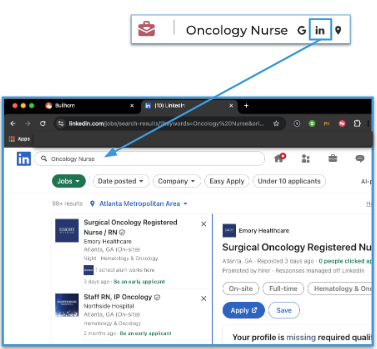
We've enhanced the LinkedIn icon in the Job record profile header. Clicking this icon now opens LinkedIn in a new browser tab and automatically searches for jobs with the same title as the one in your Bullhorn ATS.
Why does it matter?
This enhancement provides a quick, convenient shortcut for users to search LinkedIn for matching job titles directly from Bullhorn. This helps recruiters explore comparable roles, identify market trends, and source related opportunities.How do I enable this?
This update is available automatically for all Bullhorn users with no setup required. You don't need to have your ATS integrated with LinkedIn RSC or Apply Connect. The button simply launches a LinkedIn search in a new browser tab. As long as you're logged into LinkedIn, you can instantly search for matching job titles with one click.This is part of the release. Click here for release calendar details.
Was this helpful?